Licensing guide
Where to Find the MAC Address of Your exacqVision Server
Exacq issues each license for the MAC address of the recorder’s main network adapter. Send us the wrong one and the license will not fit – so here is how to get the right one in under a minute.
Three clicks in the Client
- Connect to the server in the exacqVision Client and click the gear icon at the top left.
- Expand the server in the tree on the left and choose Configure System.
- On the System tab, the License box shows MAC Address with a Copy button. Just below it, the “Subscription Expires” / “Updates through” date tells you up to which version the server may be updated.
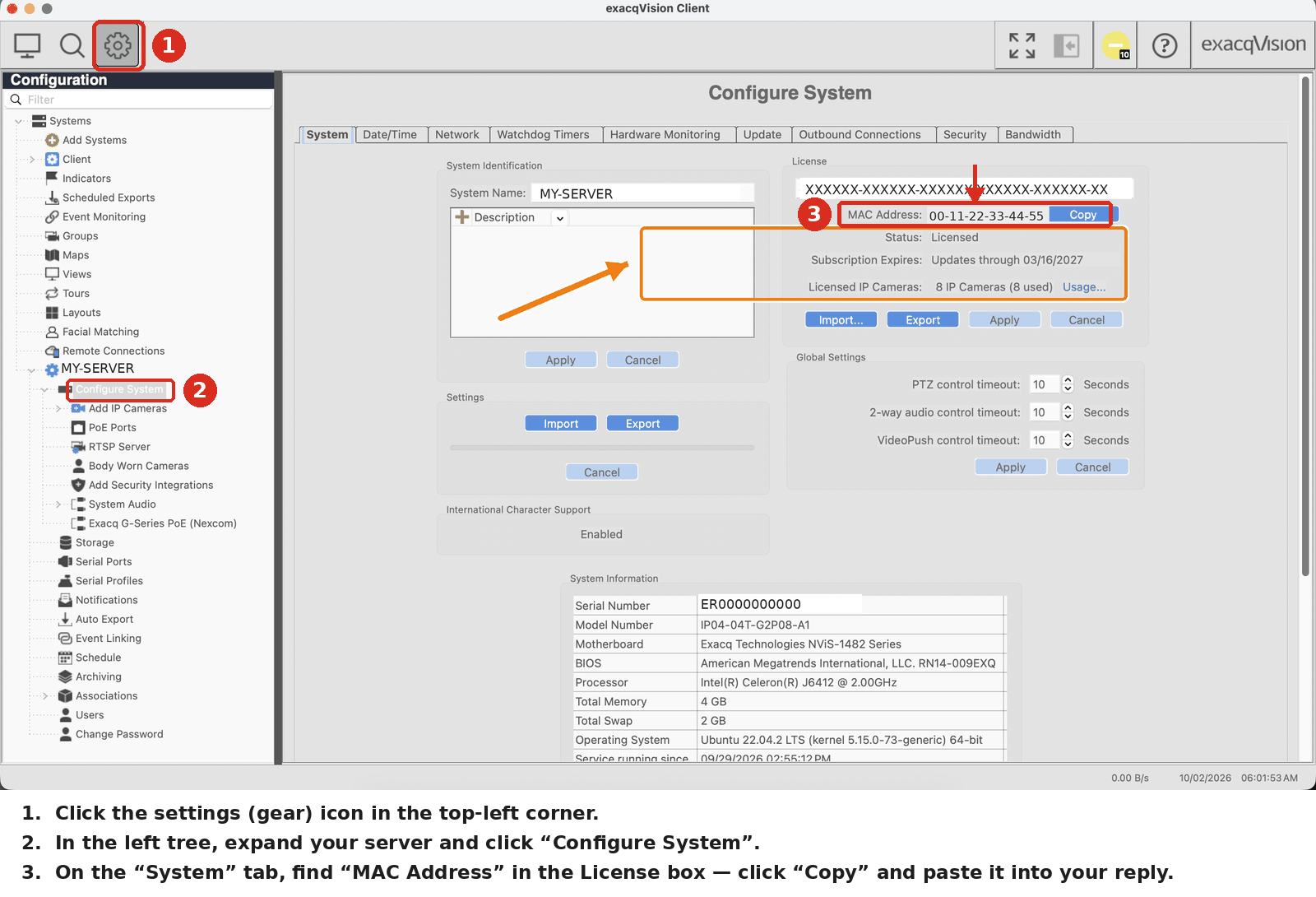
Prefer paper? Print the one-page PDF with the same annotated screenshot.
What it looks like
Twelve hexadecimal characters, usually written as six pairs: 00-1A-2B-3C-4D-5E.
Servers with several network cards
Exacq’s retrieval guidance points to the first, primary adapter. In practice: use exactly the value the License box shows – not the address of a second port, Wi-Fi or VPN adapter.
Virtual machines
Give the virtual NIC a fixed MAC address and keep it. Replacing or regenerating the adapter after the license is issued breaks the match.
Exacq-built hardware
If the server no longer starts or the MAC cannot be read, the serial number on the Exacq recorder identifies the license just as well.
Questions and answers
Can I give you the Wi-Fi MAC address?
No – use the primary adapter shown in the License box.
Do the dashes matter?
Not really; the usual dashed format is fine as long as all 12 characters are there.
The old server is dead – what now?
Send the serial number of the Exacq server and any saved license screenshots.
Can I swap the network card later?
That changes the identifier and may need another licensing step, so keep it unchanged.